

Appearance
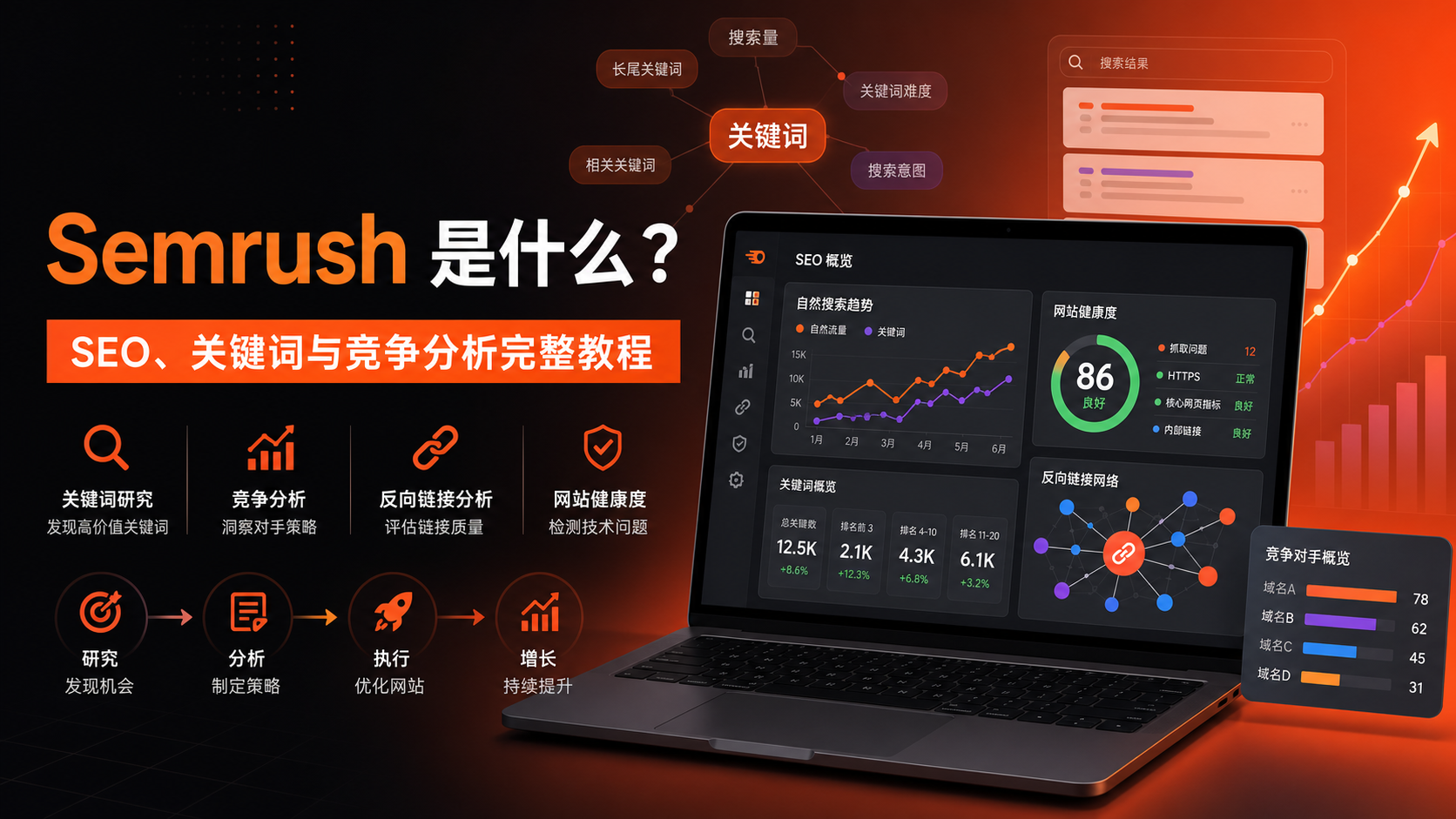
What Is Semrush? A Complete Guide to SEO, Keyword Research & Competitive Analysis
Last Updated: July 15, 2026
Target Audience: SEO professionals, content teams, cross-border e-commerce operators, independent site managers, advertising optimizers, agencies, and enterprise marketing teams
Building a website is just the beginning. The real challenge is continuously answering these questions: What content should we create? Which keywords are driving traffic for competitors? What technical issues are hurting rankings? Where should we build backlinks? Is our optimization actually driving growth?
Semrush brings keyword research, competitive analysis, technical SEO, backlink analysis, rank tracking, content optimization, and AI search visibility into one integrated toolkit. This guide walks through Semrush's current product structure with six actionable steps—from opportunity discovery to performance review.
Table of Contents
- What Is Semrush
- What Problems Semrush Solves
- Three Key Concepts Before You Start
- Step 1: Domain Overview & Competitive Research
- Step 2: Keyword Overview & Keyword Magic Tool
- Step 3: Keyword Gap Analysis
- Step 4: Backlinks & Backlink Gap
- Step 5: Site Audit
- Step 6: Rank Tracking
- Other Important Tools
- Semrush Plans & Pricing
- How Semrush Compares to Other Tools
- Strengths, Limitations & Common Misconceptions
- 30-Day Action Plan
- FAQ
What Is Semrush
Semrush is a digital marketing and search visibility platform. Its SEO tools can research any website's organic search, paid search, keywords, competitors, and backlinks. You can also create projects for your own sites to run ongoing site audits, rank tracking, and page optimization.
Two data types in Semrush must be distinguished:
- Competitive Intelligence Data: Estimated through Semrush's database and models, used to research other sites' keywords, traffic, ads, and backlinks.
- Project Data: Collected continuously for your own sites through crawlers, rank monitoring, and connections to Google Analytics 4, Google Search Console, and other data sources.
The former is for "watching competitors"; the latter is for "managing yourself." They complement each other, but don't treat estimates as exact figures from competitors' dashboards.
Product Structure in 2026
Semrush is no longer a single SEO software. It now consists of multiple toolkits:
- SEO Classic: Domain research, keywords, rank tracking, backlinks, and site audits;
- Semrush One: Traditional SEO integrated with AI search visibility;
- AI Visibility: Brand visibility in generative search like ChatGPT and Google AI;
- Traffic & Market: Website traffic, market size, audiences, and competitive landscape;
- Local: Local business listings, reviews, and map rankings;
- Content: Topic ideation, writing, and content optimization;
- Social, Advertising, AI PR: Social media, advertising, and PR tools;
- App Center: Third-party and add-on applications.
This guide focuses on the most common workflows in SEO Classic, with additions for AI search and market research developments.
What Problems Semrush Solves
Researching Competitors
- How much organic search traffic competitors receive;
- Which keywords and pages drive the most traffic;
- Where competitors perform better by country or device;
- Which backlinks and referring domains they rely on;
- What paid keywords, ad copy, and landing pages they're using.
Developing Keyword Strategies
- Search volume, difficulty, intent, and CPC for any keyword;
- Related terms, long-tail keywords, and question-based queries;
- Which keywords suit articles, category pages, product pages, or tool pages;
- Which keywords competitors rank for that you don't cover;
- Which terms are close to page one and worth prioritizing.
Maintaining Site Health
- Whether your site has crawl, index, HTTPS, duplicate content, or internal linking issues;
- Whether titles, descriptions, H1s, image ALT text, and canonical tags are properly implemented;
- Whether Core Web Vitals and page performance need improvement;
- Whether site health scores improve after fixes.
Monitoring Execution Results
- Whether target keyword rankings are rising or falling;
- Visibility gaps between you and competitors;
- Performance across countries, cities, and devices;
- Which URLs have gained or lost rankings;
- Whether SEO efforts are driving expected traffic and market share changes.
Three Key Concepts Before You Start
Database & Region
Keyword search volume, difficulty, CPC, and rankings are tied to country databases. When researching China, the US, the UK, or other markets, select the corresponding database. Data from different countries cannot be directly combined or compared.
Semrush offers a Simplified Chinese interface, but "interface language" and "keyword database" are separate. Switching the interface to Chinese does not automatically change your research scope to China.
Root Domain, Subdomain, Subfolder & Exact URL
Domain Overview lets you choose different analysis scopes:
example.com: Entire root domain;blog.example.com: Specified subdomain;example.com/blog/: Specified subfolder;example.com/page.html: Specified page.
Use root domains when researching entire companies; use subdomains and subfolders when analyzing blogs, product lines, or regional sites for greater accuracy.
Search Intent
Semrush typically categorizes search intent as:
- Informational: Users want to learn or find answers;
- Navigational: Users want to reach a specific website or brand page;
- Commercial: Users are comparing solutions, brands, or products;
- Transactional: Users are ready to purchase, download, register, or take action.
Keyword strategies shouldn't chase volume alone. Page types must match search intent—otherwise, even lengthy content may struggle to rank consistently.
Step 1: Domain Overview & Competitive Research
Go to SEO → Competitive Analysis → Domain Overview, enter your domain or a competitor's, and select the country database and analysis scope.
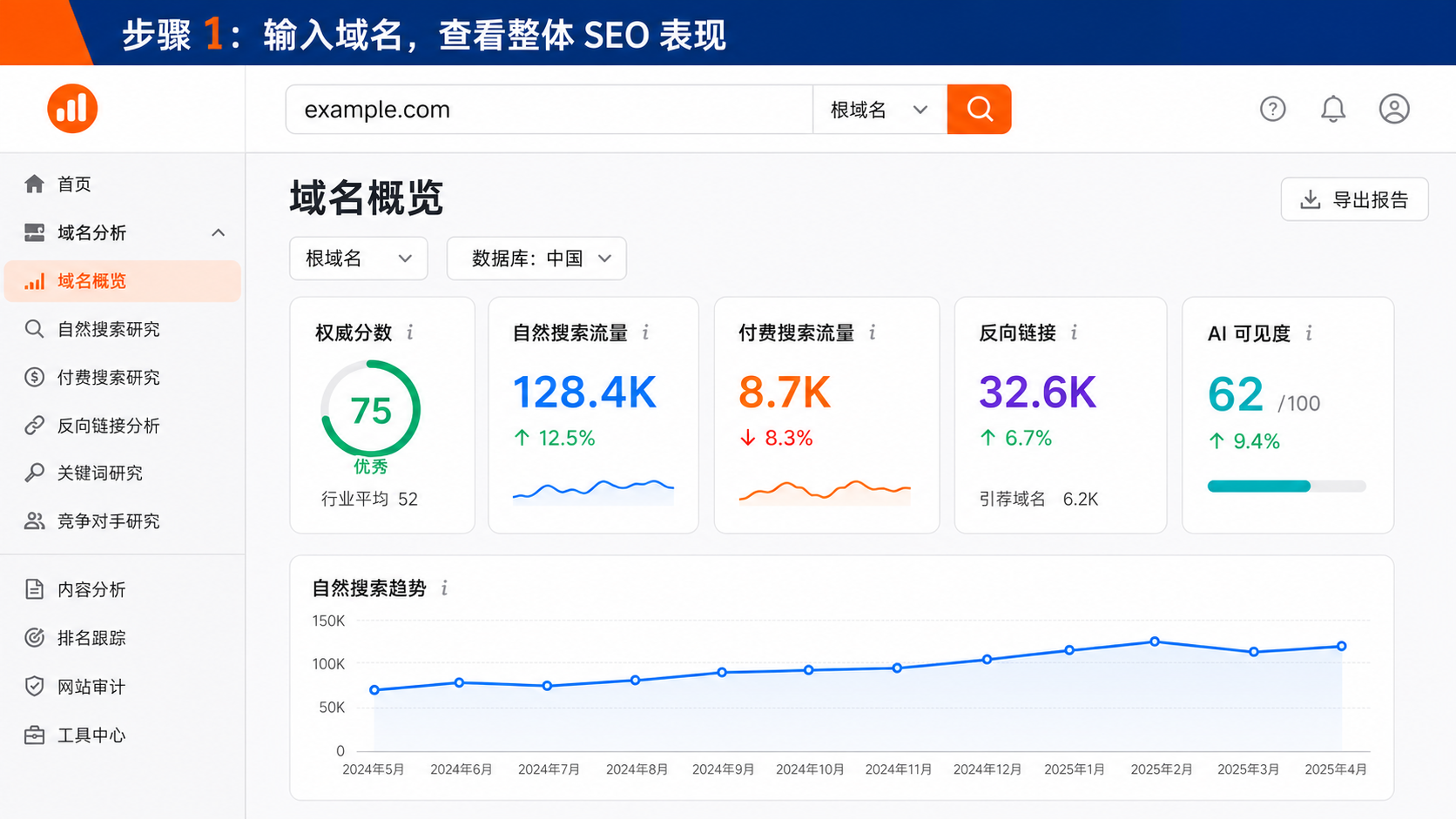
What to Look For in Domain Overview
Authority Score
This is Semrush's composite metric summarizing a domain's link quality, organic search performance, and spam signals. It's useful for comparing similar sites—not an official Google ranking factor, and higher doesn't guarantee better rankings.
Correct usage:
- Compare with direct competitors;
- Observe long-term trends;
- Evaluate potential backlink sources;
- Spot sudden drops indicating anomalies.
Incorrect usage: Treating Authority Score as your only KPI, or buying low-quality links just to increase it.
Organic Search Traffic & Keywords
Organic search traffic is Semrush's estimate based on keyword rankings, search volume, and projected click-through rates. Focus on:
- Total keywords and estimated traffic trends;
- Distribution of keywords in top 3, top 10, top 20, and top 100;
- New, improved, declined, and lost keywords;
- Ratio of branded to non-branded terms;
- Topics and pages driving the most traffic.
If estimated traffic drops suddenly, check for algorithm updates, site migrations, page deletions, competitor content changes, and SERP feature shifts.
Paid Search Traffic
This section shows paid keywords, advertising competitors, ad copy, and budget estimates. It's useful for discovering products competitors are heavily promoting and high commercial-value keywords—but doesn't reflect actual ad spend in their accounts.
Backlinks
Domain Overview only provides backlink summaries. To assess link quality, proceed to Backlinks and Referring Domains reports to examine referring domains, anchor text, link types, and new or lost links.
AI Visibility
Semrush's current Domain Overview includes AI visibility, brand mentions, cited pages, and sources. This helps determine whether a brand appears in generative answers and which pages are referenced by AI systems.
AI visibility should be analyzed separately from traditional organic search. Being mentioned by AI doesn't necessarily drive clicks, but may influence brand awareness and user decisions.
From Domain Overview to Deeper Analysis
Every number in Domain Overview is an entry point. Click through in this order:
- Organic search traffic → Organic Rankings;
- Top keywords → Check intent, position, and URL;
- Top pages → Analyze page types and topics;
- Competitors → Build a list of competing domains;
- Backlinks → Review referring domains and anchor text;
- AI visibility → Check brand mentions and citation sources.
Step 2: Keyword Overview & Keyword Magic Tool
Keyword Overview
Go to Keyword Research → Keyword Overview, enter a core term, and select your database.
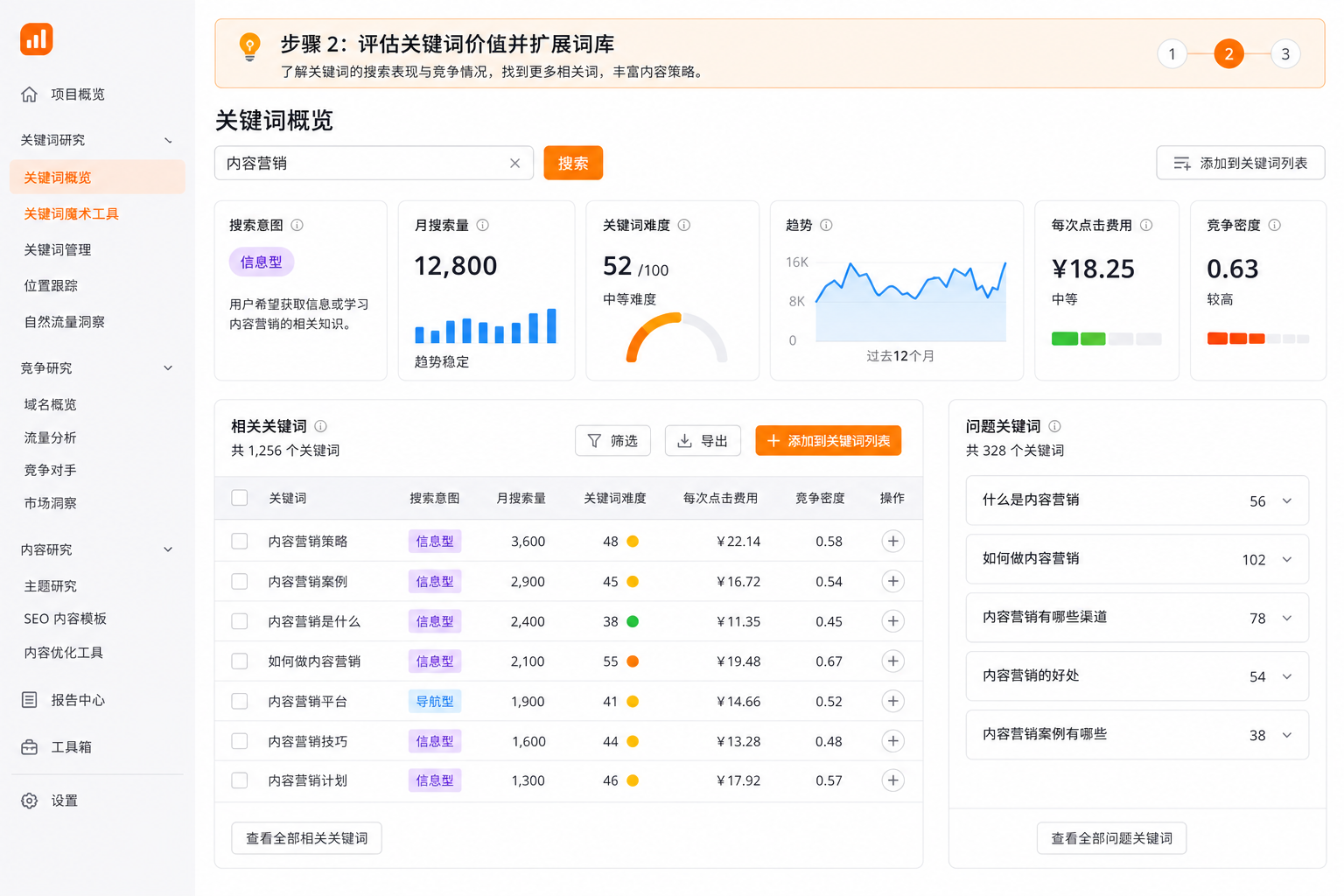
Core metrics in Keyword Overview include:
| Metric | Meaning | How to Use |
|---|---|---|
| Search Intent | Purpose behind the search | Determines page type and conversion design |
| Monthly Search Volume | Average monthly queries | Indicates demand scale, not guaranteed traffic |
| Global Volume | Sum across multiple country databases | For international markets; don't use for single-region targeting |
| Keyword Difficulty | Competition level for top organic positions | Assess alongside your site's strength |
| Personalized Keyword Difficulty | Difficulty adjusted for your domain's relevance | More useful than generic KD for prioritization |
| Trend | Demand changes over past 12 months | Judge seasonality and content timing |
| CPC | Estimated cost per click for ads | Indicates commercial value and paid competition |
| Competition Density | Advertiser competition level | For paid search evaluation |
Don't Just Pick High-Volume Keywords
A high-volume keyword may be too broad, too competitive, or irrelevant to your business. Use this four-factor scoring:
text
Keyword Priority = Business Relevance × Intent Match × Rankability × Potential ValueSearch volume is just one variable. For B2B, high-value, or niche markets, dozens of high-intent searches may outperform tens of thousands of generic visits.
Keyword Magic Tool
From Keyword Overview, enter Keyword Magic Tool to expand related terms in bulk. Common filtering methods:
- Broad Match: Discover larger topic ranges;
- Phrase Match: Preserve core phrases;
- Exact Match: Study close variants;
- Related: Find semantically connected new topics;
- Questions: Extract "what, how, why" content ideas;
- Intent Filter: View only informational, commercial, or transactional;
- KD, Volume, CPC: Narrow by resources and commercial value;
- Include/Exclude: Filter brand terms, location words, or irrelevant meanings.
After filtering, add candidates to Keyword Strategy Builder, then cluster by topic. Don't mechanically cover dozens of differently-intented keywords with one page.
Step 3: Keyword Gap Analysis
Go to Competitive Analysis → Keyword Gap. Enter your site and up to four competitors, select organic, paid, or Shopping ad keywords, then click Compare.
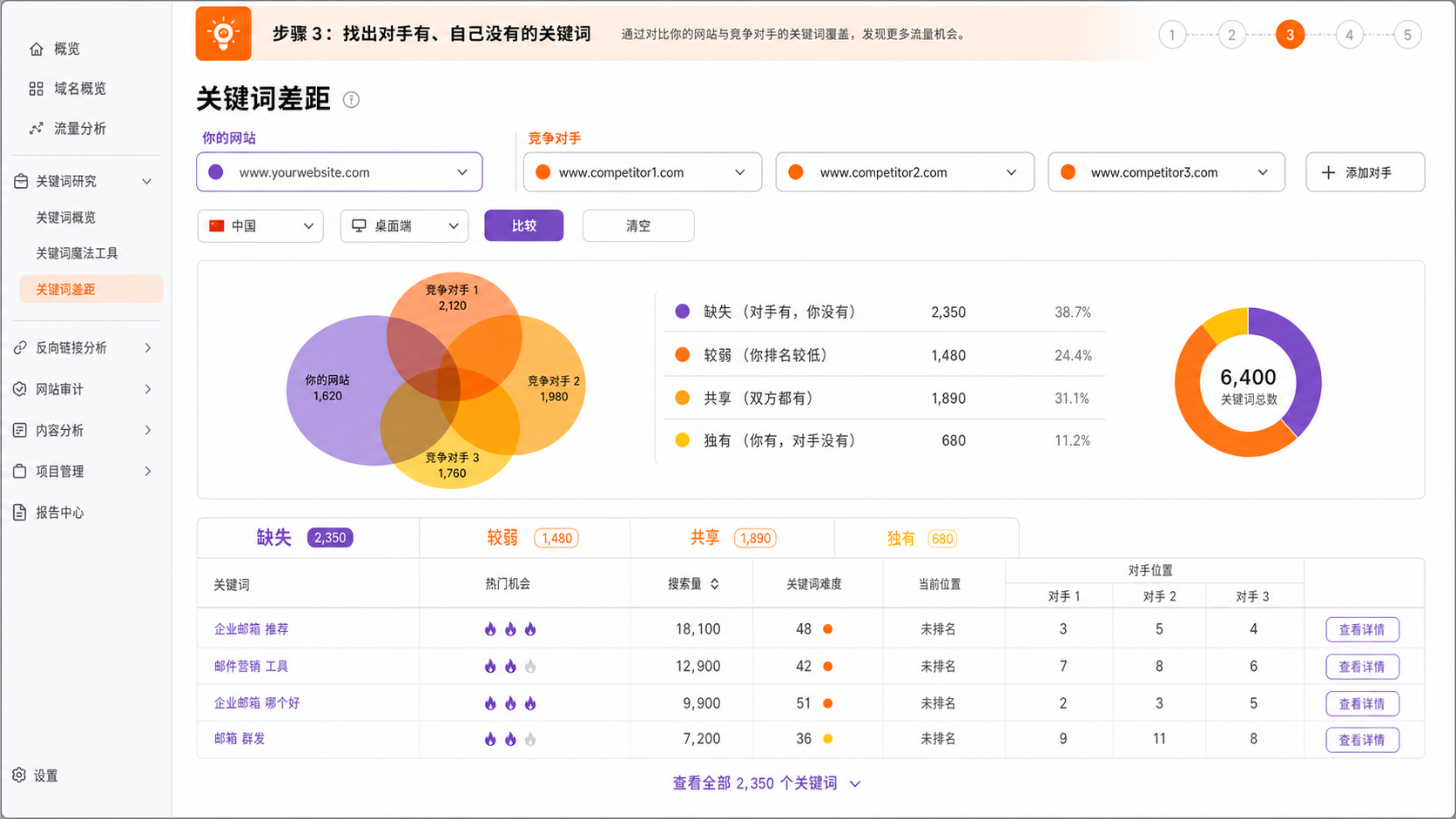
Five Types of Keyword Opportunities
- Missing: Competitors rank, you have no ranking;
- Weak: Both rank, but you're lower;
- Strong: You outrank all competitors;
- Shared: Both you and competitors rank;
- Untapped/Unique: Opportunities appearing only on some compared sites.
Different interface versions may use terms like "Untapped, Missing, Unique"—the core logic compares keyword sets and ranking differences.
Proper Filtering Sequence
- Select 3–4 competitors closest to your business;
- Start with "Missing" and "Weak";
- Add search intent filters;
- Limit keyword difficulty to your site's capacity;
- Exclude brand terms and irrelevant topics;
- Check SERPs to confirm page types;
- Add 5–10 priority keywords to your keyword list.
Official guidance recommends focusing on fewer keywords initially. Exporting thousands of terms without execution resources typically delivers less value than a clear 10-keyword plan.
Deciding: New Page or Optimize Existing?
- No corresponding page on your site: Create new content;
- Existing page ranks 11–30: Prioritize updating the current page;
- Multiple pages competing for same keyword: Address keyword cannibalization;
- SERPs dominated by product pages: Don't force blog articles to compete;
- Competitor pages clearly more comprehensive: Fill gaps in topic coverage, evidence, structure, and user experience.
Step 4: Backlinks & Backlink Gap
Backlinks
Enter any domain to view:
- Total backlink count;
- Referring domains;
- New and lost links;
- Follow, Nofollow, Sponsored, UGC attributes;
- Anchor text;
- Referring IP and network distribution;
- Pages with most backlinks;
- Similar backlink competitors.
Don't focus only on link volume. Thousands of sitewide links from one domain often underperform multiple natural links from relevant, high-quality sites.
Backlink Gap
Go to Competitive Analysis → Backlink Gap, enter your site and competitors.
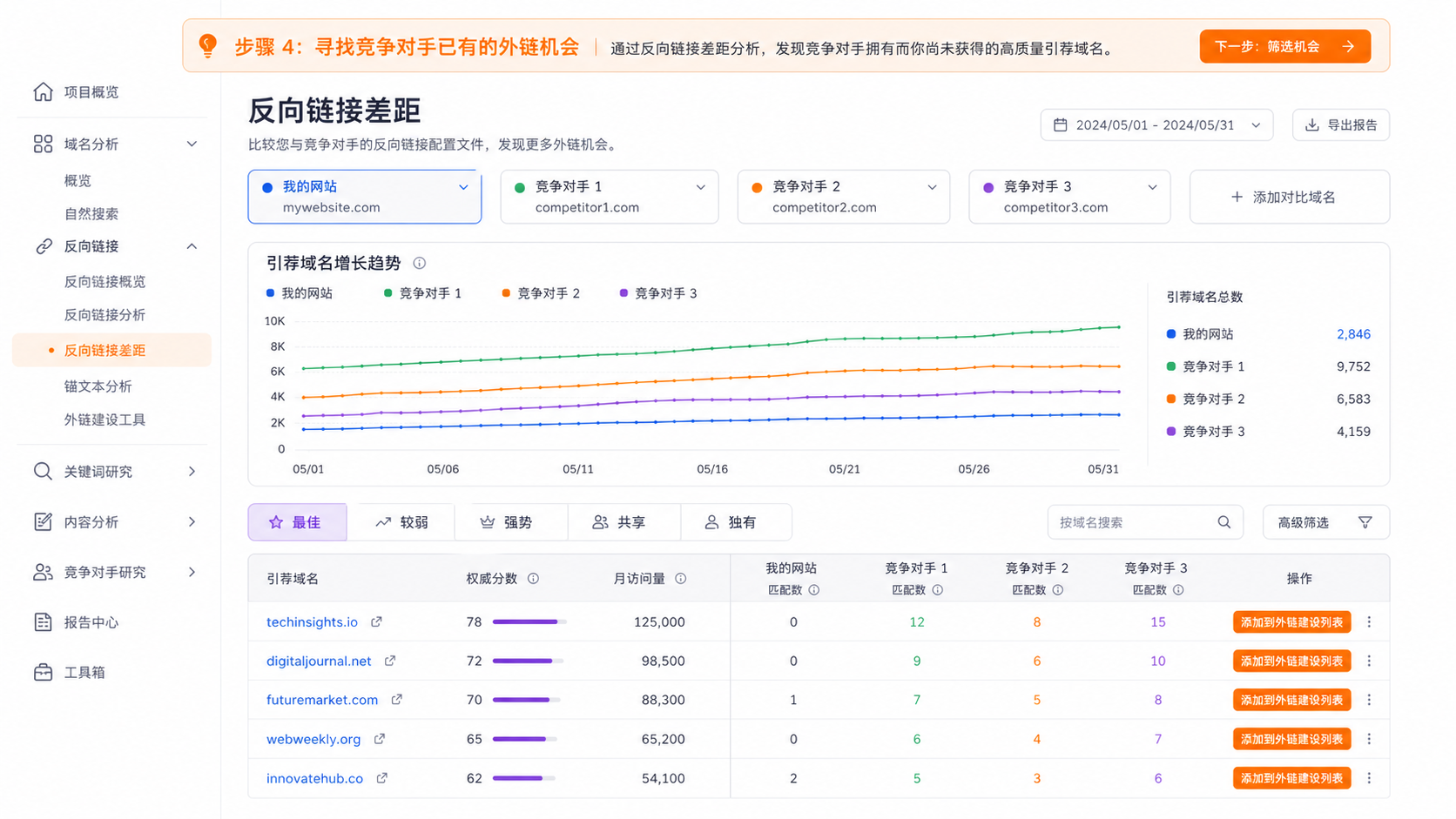
The report lists referring domains linking to competitors, filtered by opportunity type:
- Best: Links to multiple competitors, not to you;
- Weak: Links to you less than to competitors;
- Strong: Links only to you;
- Shared: Links to both you and competitors;
- Unique: Links to only one compared site.
"Best" is typically the highest-priority list to research, as sites willing to link to multiple similar competitors have higher probability of accepting your industry's content, resources, or partnerships.
Backlink Opportunity Checklist
Before outreach, verify:
- Topic relevance;
- Real readership and organic traffic;
- No Authority Score anomalies;
- No sudden, suspicious backlink growth;
- Page is indexed;
- Link placement would be natural;
- Clear reason why they'd cite your content.
Actionable strategies include original data, free tools, industry reports, expert perspectives, resource page partnerships, broken link replacement, and digital PR. Don't equate "competitor has this link" with "this link is definitely safe."
Backlink Audit
This tool evaluates suspicious signals in your site's backlink profile. Risk labels are for filtering only—don't automatically submit all high-risk links to Google's Disavow tool. Incorrectly disavowing normal links can harm rankings. Important actions should combine Search Console data, link source review, and manual verification.
Step 5: Site Audit
Go to Site Performance → Site Audit, create a project, and set crawl scope.
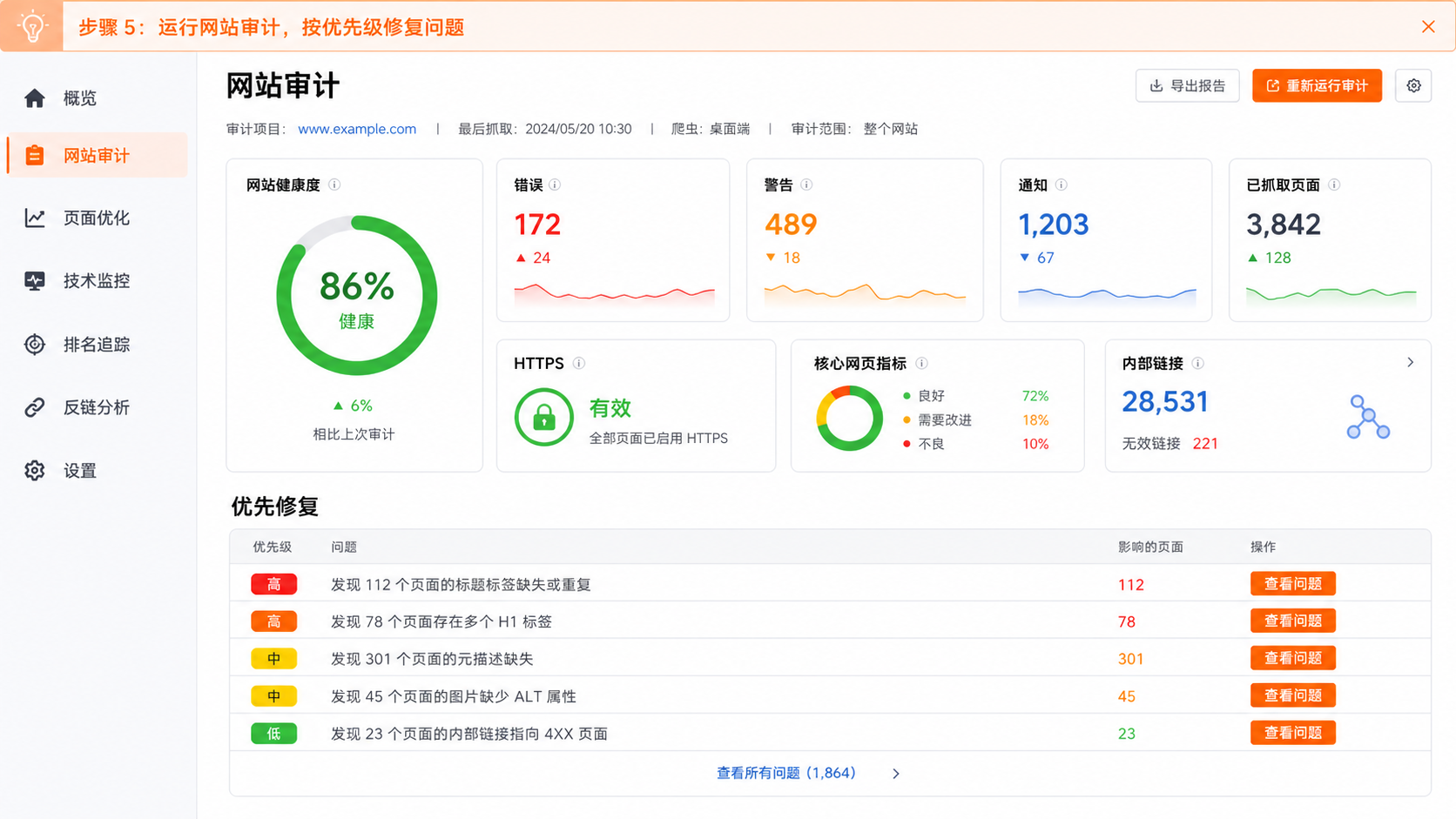
Settings When Creating an Audit
- Number of pages to crawl;
- Start from website, sitemap, or URL list;
- Whether to respect robots.txt;
- Desktop or mobile crawler;
- Crawl speed;
- Include or exclude specific directories;
- Login credentials for test environments.
For first audits, start with a manageable page count. Large sites should audit by directory to avoid overwhelming reports.
Errors, Warnings & Notices
- Errors: Highest priority—may directly impact crawling, indexing, or user access;
- Warnings: Require evaluation—typically affect quality or maintainability;
- Notices: Optimization suggestions—not all need fixing.
Common issues include:
- 4xx, 5xx status codes;
- Redirect chains and loops;
- Missing or duplicate titles and descriptions;
- Improper H1 usage;
- Canonical tag conflicts;
- Sitemap and robots.txt issues;
- Orphan pages and excessively deep internal linking;
- Missing image ALT text;
- HTTPS mixed content;
- Page speed and Core Web Vitals.
Proper Fix Priorities
Address in this order:
- Issues affecting crawling and indexing;
- Template issues affecting many pages;
- High-traffic, high-conversion pages;
- Internal linking and canonicalization;
- Content tags and image details;
- Low-impact notices.
Site health is a summary metric—don't chase 100% by modifying content with no business impact. Re-run audits after fixes and track issue counts and affected page changes.
Step 6: Rank Tracking
Go to Site Performance → Position Tracking, create a project, and select search engine, country, city, device, and keywords.
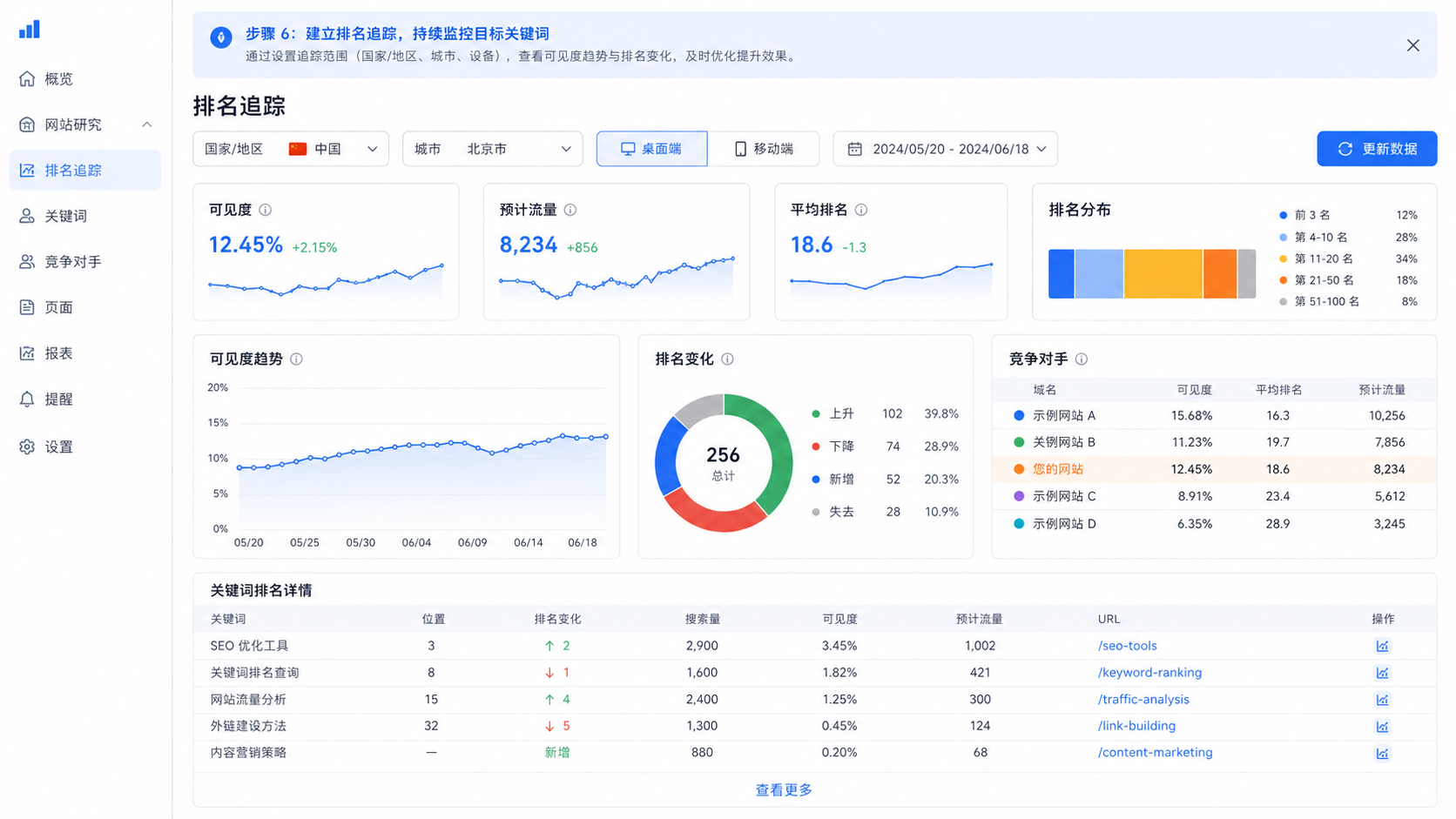
Common Setup Mistakes
- Wrong country or city selected;
- Mixing desktop and mobile data;
- Combining branded and non-branded terms;
- Adding too many irrelevant keywords at once;
- Not adding true search competitors;
- Looking only at rankings, not corresponding URLs.
Core Metrics
- Visibility: Calculated from tracked keyword rankings and estimated CTR;
- Estimated Traffic: Projected visits from tracked keywords;
- Average Position: Mean ranking across all tracked keywords;
- Position Distribution: Count in top 3, 4–10, 11–20, 21–50, 51–100;
- Improvements/Declines: Keywords with ranking changes;
- New/Lost: Keywords entering or leaving top 100;
- Share of Voice: Advanced plans for measuring market visibility share.
How to Review Ranking Changes
Check weekly for anomalies, formally review monthly:
- Check if overall visibility changed;
- Identify keywords with largest drops;
- Verify if ranking URLs switched;
- Compare search results with competitor pages;
- Check page content, internal links, and technical status;
- Record this month's published, updated, and backlink actions;
- Determine if changes came from your actions, competitors, or algorithm updates.
Don't rewrite pages immediately due to daily fluctuations. Rankings have normal variance—decisions should be based on sustained trends and SERP changes.
Other Important Tools
Organic Rankings
View all keywords a domain currently ranks for, with search intent, position, changes, estimated traffic, SERP features, and corresponding URLs. Sort by search volume or traffic to quickly identify competitors' most effective content.
Top Pages
Display site pages by estimated organic traffic or keyword count. Useful for determining whether competitors use articles, product pages, category pages, tool pages, or templated pages.
Compare Domains
Place multiple domains in one report to compare organic search, paid search, and backlink performance—ideal for executive competitive benchmarking reports.
Traffic & Market
Focus on total visits, session duration, bounce rate, channels, audiences, and market share. Separate from SEO Toolkit, functionality closer to Similarweb; verify your target plan includes this before purchasing.
Keyword Strategy Builder
Cluster keywords into topics and pages to build pillar pages, subtopics, and content architecture. Clustering results are starting points—still require manual review of search intent and SERPs.
SEO Writing Assistant
Provides readability, SEO, originality, and tone suggestions based on target keywords and competitor pages. Useful for editing phases—shouldn't replace expert fact-checking and brand voice.
Topic Research
Generate related subtopics, headlines, and questions from a topic for content ideation. Legacy features like Post Tracking mentioned in older articles may have been adjusted or migrated—refer to current Content toolkit.
On Page SEO Checker
Compare your pages with ranking competitors to suggest semantic, content, backlink, technical, and UX improvements. Only address suggestions relevant to page goals and supported by evidence.
AI Visibility
Track brand mentions in generative search, citation sources, question topics, and competitive performance. AI search optimization should still build on crawlable sites, reliable content, clear entity information, and traditional SEO foundations.
Semrush Plans & Pricing
Semrush's product bundles, prices, and add-ons change frequently. Below are main SEO Classic plans as of July 2026—actual billing refers to official pricing page.
| Plan | Annual Equivalent/Month | Monthly Price | Best For | Main Limits |
|---|---|---|---|---|
| Pro | US$117.33 | US$139 | Individuals, freelancers, small projects | 5 tracked sites, 500 tracked keywords |
| Guru | US$208.33 | US$249 | Small businesses, growing teams, agencies | 15 tracked sites, 1,500 tracked keywords |
| Business | US$416.66 | US$499 | Mid-to-large enterprises, mature agencies | 40 tracked sites, 5,000 tracked keywords |
Key Differences by Plan
- Pro: Keyword research, competitive analysis, rank tracking, backlinks, site audits;
- Guru: Adds historical data, multi-location & device tracking, content optimization tools;
- Business: Adds Share of Voice, higher limits, API, and migration support.
Official knowledge base lists typical crawl limits: Pro 100K pages/month, Guru 300K pages/month, Business 1M pages/month. Report results, daily queries, exports, and metric refreshes have separate limits.
What Free Accounts Can Do
Free accounts typically allow limited domain and keyword queries with partial tool access, but daily requests, report results, and project capabilities are restricted. Suitable for evaluating the interface, not for ongoing multi-site management.
Semrush's official page may offer 7-day trials. Before starting, confirm:
- Which toolkit the trial covers;
- Auto-renewal price after trial ends; | Whether Traffic & Market, Local, Content, etc. require separate purchase;
- Whether keyword, project, user seats, and export limits meet your needs.
How Semrush Compares to Other Tools
| Tool | Best For | Best Suited To |
|---|---|---|
| Semrush | Keywords, competitive SEO, site audits, rank tracking, multi-channel marketing | SEO and marketing teams needing complete execution workflows |
| Similarweb | Full-channel traffic, market share, audiences, industry trends | Strategy, market research, and growth teams |
| Ahrefs | Keywords, content exploration, backlink research | SEO, content, and link-building teams |
| Google Search Console | Your site's Google impressions, clicks, indexing, and issues | All website owners |
| Google Analytics 4 | Your site's user behavior, events, and conversions | Product, operations, and data teams |
Semrush vs. Similarweb
Similarweb emphasizes overall traffic and market landscape; Semrush emphasizes search marketing and execution. Similarweb is more intuitive for "who's growing in this industry"; Semrush is more complete for "what to write, what to fix, what to track."
Semrush vs. Ahrefs
Both handle keyword and backlink research. Ahrefs focuses more tightly on search and links; Semrush covers more modules including site audits, ads, content, local, social, and AI visibility. Choose based on actual team workflows, not simply database size comparisons.
Semrush vs. Search Console
Search Console shows your site's real Google search data; Semrush researches competitors and enables cross-country, keyword, and tool comparisons. Best practice: use Semrush to discover opportunities, Search Console to verify your site's actual performance.
Strengths, Limitations & Common Misconceptions
Strengths
- Complete feature coverage connecting research, execution, and monitoring;
- Strong competitor keyword and page research capabilities;
- Keyword intent, gap, and clustering tools suited for content planning;
- Site audits and rank tracking for ongoing project management;
- Backlink analysis, gap, and building tools forming complete workflows;
- Multi-country database support and Simplified Chinese interface;
- Reports, exports, API, and third-party integrations for team collaboration;
- Added AI search visibility capabilities.
Limitations
- Many features create higher learning curve for beginners;
- Competitor traffic and keyword clicks are estimates;
- Complex packages and add-on tools, potentially higher total cost;
- Data coverage for specific markets like mainland China and Google ecosystem requirements need separate evaluation;
- Different tools use different metric definitions—not directly additive;
- Automated suggestions don't equal correct strategy—still require business and search intent judgment;
- Large sites may need higher-tier plans for crawl, report, and export limits.
Common Misconceptions
Only Looking at Keyword Search Volume
High volume doesn't mean suitable. Also consider intent, difficulty, SERP, business value, and site strength.
Copying All Competitor Keywords
Competitors' branded terms, legacy business lines, and low-conversion content may not suit you. Competitive analysis aims to understand strategy, not mechanical replication.
Treating Authority Score as a Google Metric
Authority Score is Semrush's third-party metric. Useful for comparison and filtering—not proof of Google ranking factors.
Chasing 100% Site Health
First fix issues affecting crawling, indexing, important pages, and user experience. Notifications without business impact don't need priority.
Disavowing Links at First "Risk" Sign
Automated risk labels may misjudge. Disavowing is high-risk—requires manual review and confirmed real problems.
Rewriting Pages Daily Due to Ranking Fluctuations
Rankings have normal variance. Use weekly and monthly trends, combined with algorithm, competitor, and page changes for decisions.
30-Day Action Plan
Week 1: Establish Baseline
- Connect GA4 and Search Console;
- Create projects;
- Run first site audit;
- Export current errors, warnings, and health score;
- Add 3–5 core competitors;
- Set up rank tracking for 20–50 priority keywords.
Week 2: Research Opportunities
- Use Domain Overview and Organic Rankings to research competitors;
- Use Keyword Gap to filter "Missing" and "Weak";
- Use Keyword Overview to confirm intent and difficulty;
- Use Keyword Magic Tool to expand long-tail and question keywords;
- Build keyword groupings and page mappings.
Week 3: Execute Optimizations
- Fix technical issues affecting crawling and indexing;
- Update old pages close to page one;
- Create new content for missing topics;
- Improve titles, structure, evidence, and internal linking;
- Build outreach lists using Backlink Gap.
Week 4: Review
- Re-run site audit;
- Check ranking visibility and URL changes;
- Compare with Search Console's real clicks and impressions;
- Record new content, fixes, and backlink actions;
- Determine 5–10 priorities for next month.
Monthly Report Template
| Dimension | This Month | MoM Change | Cause Analysis | Next Month Action |
|---|---|---|---|---|
| Organic search clicks | ||||
| Non-branded visibility | ||||
| Top 10 keywords | ||||
| Site health score | ||||
| Critical technical errors | ||||
| New referring domains | ||||
| Published/updated pages |
FAQ
Does Semrush have a Simplified Chinese interface?
Yes. Interface language can be switched, but database and search region must be selected separately in each report.
How accurate is Semrush data?
Your site's GA4, Search Console, and server data are closer to real values. Semrush's competitive intelligence data is suitable for comparison, trend discovery, and opportunity research—not as exact competitor dashboard figures.
Can Semrush replace Search Console and GA4?
No. Search Console and GA4 are first-party data for your site; Semrush provides competitive research, keyword databases, audits, and rank monitoring. Use all three together.
Which tool should beginners learn first?
Recommended order: Domain Overview → Keyword Overview → Keyword Magic Tool → Keyword Gap → Site Audit → Position Tracking. After mastering these six, proceed to backlinks, content optimization, ads, and AI visibility.
What keyword difficulty is suitable?
No universal number. New sites should start with highly relevant, clearly-intented, lower-difficulty long-tail keywords; authoritative sites can compete for higher-difficulty topics. Personalized keyword difficulty is more valuable than generic KD.
Is Semrush suitable for Chinese SEO?
It supports Chinese interface and partial Chinese market databases, but test keyword coverage for your target region and industry first. For Baidu, Xiaohongshu, WeChat, or other non-Google ecosystems, combine with corresponding platform data tools.
When should I upgrade to Guru or Business?
Upgrade when you need historical data, multi-region/device tracking, content optimization, higher report limits, Share of Voice, or API. Individuals and single small projects can usually start with Pro.
Summary
Semrush's value isn't in showing more numbers—it's in connecting SEO work into a closed loop:
text
Research competitors → Discover keywords → Plan pages → Fix technical issues
→ Build backlinks → Track rankings → Review with real dataFor teams just starting, the priority isn't using all tools at once—it's establishing a sustainable process: fixed monthly competitor research, selecting limited opportunities, executing optimizations, and reviewing results.
Use Semrush to discover direction, Search Console and GA4 to verify results, and business revenue and conversions to determine next resource allocation.
References
- Semrush Official Website
- Semrush SEO Classic Plans & Pricing
- Domain Overview Official Documentation
- Keyword Overview Official Documentation
- Keyword Gap Official Documentation
- Backlinks Official Documentation
- Backlink Gap Official Documentation
- Position Tracking Official Documentation
- Reference Article: SEMrush Tutorial
This is original content organized from reference article information architecture, rewritten based on Semrush 2026 official navigation, knowledge base, and pricing pages. Operational screenshots are original Simplified Chinese interface demonstrations based on current features; values are for illustrative purposes only and do not represent real-time reports or official Semrush screenshots.